Radar Summary Chart
Learn to interpret the retired radar summary chart and use current radar imagery, data-age checks, and weather limitations for flight planning.
Introduction to Radar Summary Chart
- Current radar observations are collected repeatedly and processed into single-site images and mosaics, generally updating on a scale of minutes.
- Understand radar operating modes, issuance and validity, and coverage and beam height before interpreting the display.
- Compare current radar products, interpret echo intensity, and recognize convective and stratiform precipitation.
- Account for misleading returns, data age, and interpretation limits; learn the airport-area role of Terminal Doppler Weather Radar.
- The traditional radar summary chart is a retired product. Its historical format and worked decoding example are retained for reference.
- Reinforce your understanding of Radar Summary Chart by completing the knowledge quiz and interactive scenario, comparing your performance with the applicable Airman Certification Standards, and reviewing the topic summary before moving on.
Radar Summary Chart Key Highlights
- Current radar products and the retired radar summary chart use different formats; archived charts are not operational weather.
- Scan strategy, product processing, and delivery all affect updates; a refreshed display does not establish a new observation.
- Radar coverage and resolution vary with height and distance; blank areas can contain undetected precipitation.
- Base reflectivity samples the lowest scan; composite reflectivity selects the strongest return in the vertical column.
- Use the selected product legend: reflectivity does not directly measure turbulence, icing, or snowfall rate.
- Convective and stratiform patterns offer useful clues, but weak echoes do not exclude serious weather hazards.
- Ground clutter, anomalous propagation, biological targets, chaff, wind turbines, and bright bands can mislead interpretation.
- Echo tops describe detected precipitation, not cloud tops or a safe altitude above a storm.
- Datalinked mosaics support strategic avoidance, not close-range navigation through gaps.
- Terminal Doppler Weather Radar supports airport-area hazard detection; imagery does not replace wind-shear alerts.
Historical Radar Summary Chart
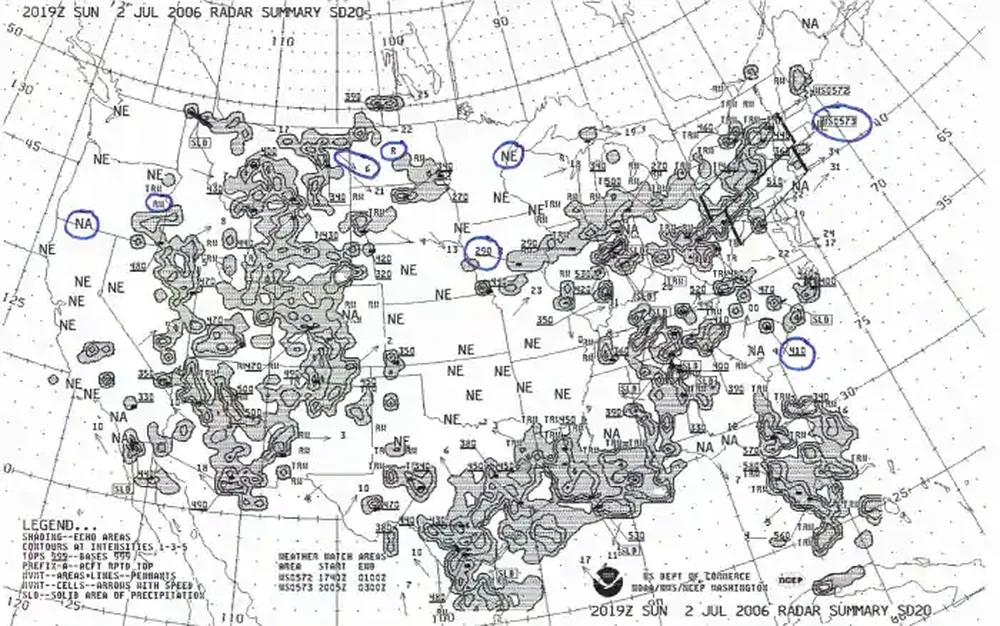
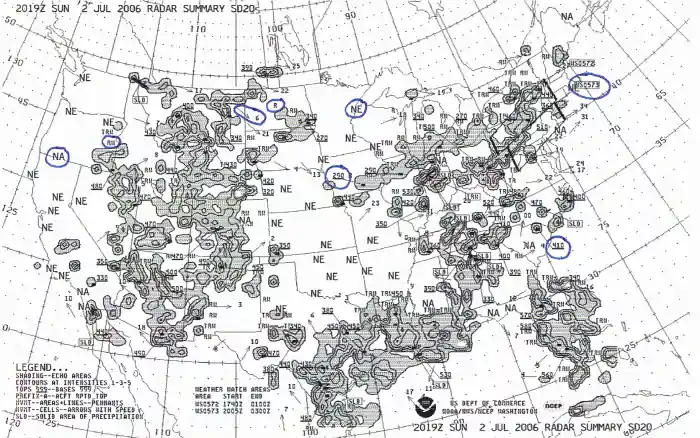
- The chart combined radar echo intensity contours over the contiguous United States with precipitation types, cell movement, maximum echo tops and weather watches.
- The National Centers for Environmental Prediction (NCEP) stopped producing the legacy radar summary and radar legend graphics on June 11, 2013, beginning with the 1200 Coordinated Universal Time (UTC) cycle. National Weather Service retirement notice.
- Keep this example for historical interpretation. Obtain operational weather from current briefing sources; an archived chart cannot describe conditions for today's flight.
Issuance & Validity
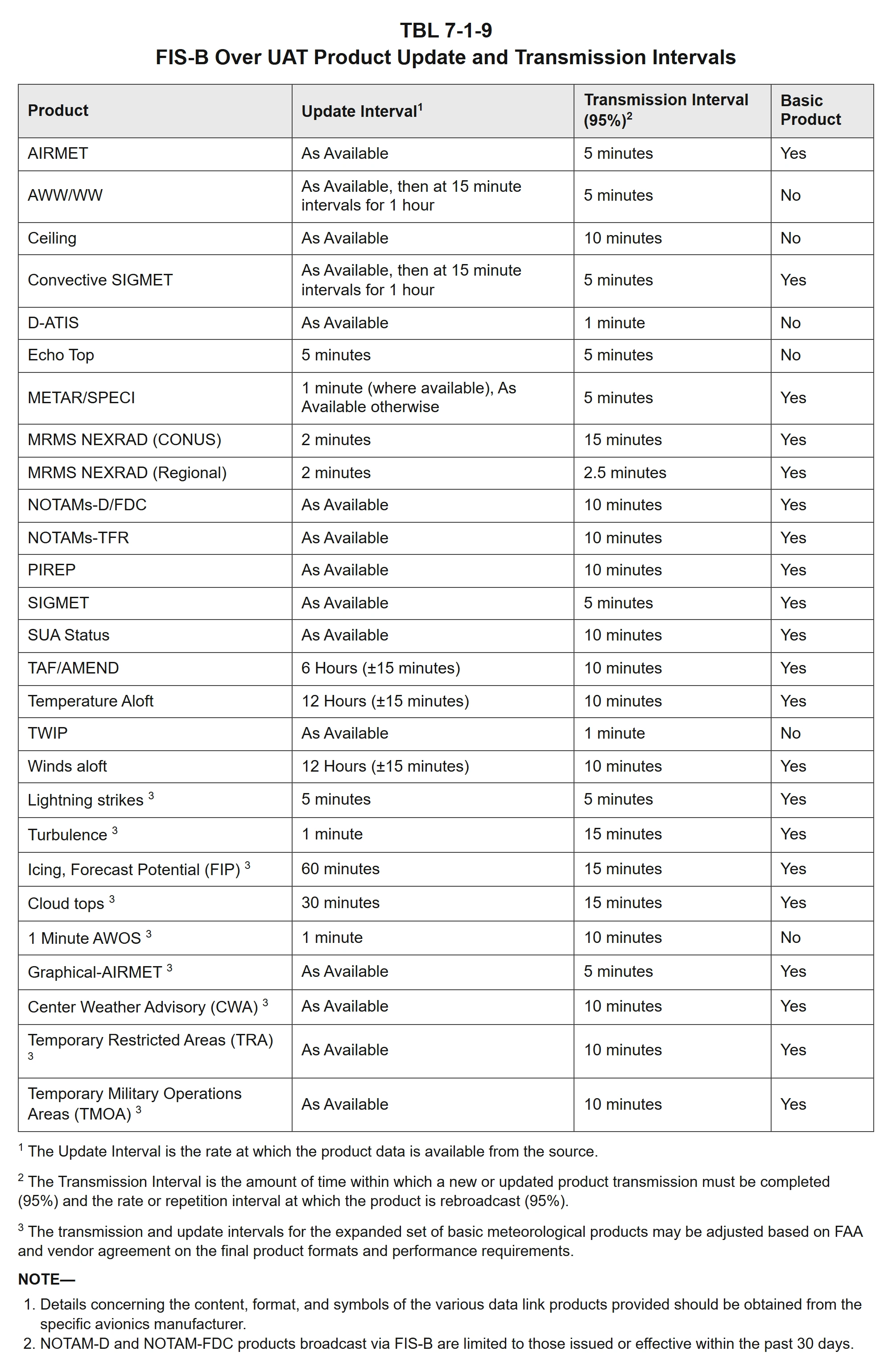
- Issuance and updates: there is no universal hourly issuance schedule:
- Scan timing varies with the radar's operating mode and scan strategy, while each provider controls its product-generation and display-refresh intervals.
- A refreshed webpage or app does not necessarily contain a new radar observation.
- Product updates versus delivery: source-update and broadcast intervals are separate; neither guarantees the age of the weather shown on the screen.
- For Flight Information Service–Broadcast (FIS-B), the Federal Aviation Administration (FAA) Aeronautical Information Manual lists Multi-Radar/Multi-Sensor (MRMS) Next Generation Weather Radar (NEXRAD) source updates every 2 minutes for both regional and contiguous United States imagery.
- The corresponding 95-percent transmission intervals are 2.5 minutes for regional imagery and 15 minutes for contiguous United States imagery.
- Echo-top source updates and transmission intervals are both 5 minutes.
- These intervals apply to the listed FIS-B products; other services may differ. The accompanying table includes the FAA's definitions and notes.
- Time represented: the handbook assigns a WSR-88D observation time to the end of the last scan; radar sites are not synchronized. Check the image's date, time, selected animation frame, and time zone. Coordinated Universal Time (UTC), also shown as Z, may differ from the local time selected in an app. Distinguish the radar observation time from mosaic-creation, receipt, and display-refresh times using the provider's documentation. A mosaic combines radars that may have sampled the weather at different times, so one timestamp does not establish the age of every echo.
- Latency: scanning, processing, combining images, transmission, and reception all add delay. The FAA Aviation Weather Handbook warns that weather in datalink NEXRAD mosaics may be 15–20 minutes older than the displayed age. This is a latency warning, not a fixed delay to subtract or a safe-use window. Confirm that timestamps advance, check missing-data or stale-data indications, and do not interpret an outage or unavailable coverage as clear weather.
- Validity and use: observed radar imagery describes weather already sampled; it does not establish a forecast-valid period or promise unchanged conditions until the next update. Review the newest available image and its recent loop for movement and development, recognizing that storms can change between scans. Use datalink mosaics for strategic route planning and broad avoidance, not for selecting gaps or penetrating storms. A future-time radar animation is a separate forecast product and must be interpreted using its own valid time and limitations.
Reading the Historical Chart
- Start with the printed date, UTC time and legend. Space limitations could cause information to be shortened or omitted.
- The legacy chart depicted precipitation type, intensity contours, coverage, line echoes, cell movement and maximum echo tops.
- It did not provide a complete briefing or depict ceilings, visibility, freezing levels, frontal boundaries, or forecast turbulence layers. These require other weather products.
- Use Advisory Circular 00-45G, Section 5.6 for this retired format; use the current Federal Aviation Administration (FAA) Aviation Weather Handbook, Section 24.6 for modern radar observations.
Fronts and Other Weather Boundaries
- The historical radar summary chart did not plot fronts. Its echo contours and lines of precipitation were not frontal symbols.
- Use the Surface Analysis Chart for analyzed frontal positions and prognostic charts for forecast positions. Read the legend of any modern display that overlays fronts on radar.
Historical Precipitation Intensity
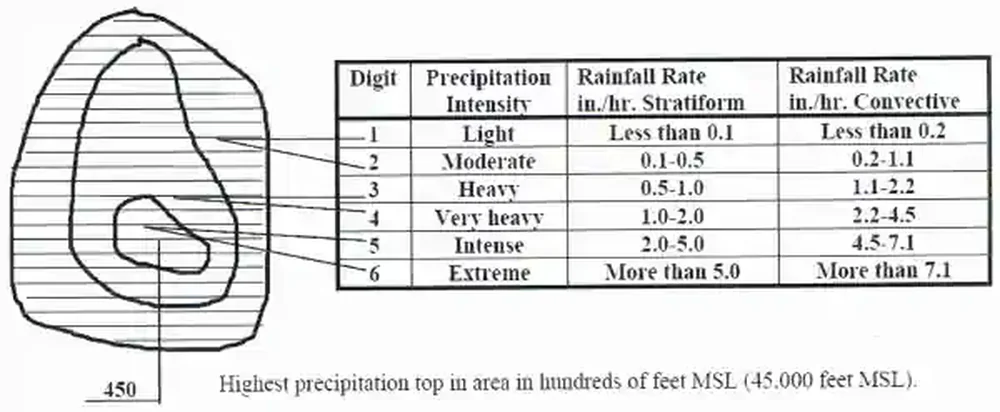
- Six reported precipitation intensity levels were grouped into three contours: levels 1–2, 3–4, and 5–6. Contour boundaries began at levels 1, 3 and 5.
- These historical levels described light/moderate, heavy/very heavy, and intense/extreme precipitation, respectively. Their rainfall-rate interpretation applied to liquid precipitation, not reliably to snow.
- Modern images use their provider's reflectivity legend. Do not equate the old contour numbers with a modern color or directly with turbulence severity.
Historical Radar Echoes
Precipitation Type:
- Historical symbols were R (rain), RW (rain showers), S (snow), SW (snow showers), and T (thunderstorms). These were not the code format used in routine aviation weather reports.
- Possible precipitation type was model determined. Freezing precipitation was not plotted; its absence did not rule out freezing rain or an icing hazard.
Configuration and Coverage:
- Echoes could be reported as a line, area or isolated cell. A line with at least eight-tenths coverage was labeled solid (SLD).
- Shaded grid boxes could exaggerate the actual area containing precipitation: only part of a grid box needed an echo for the entire box to be shaded.
Echo Tops:
- Underlined three-digit values gave maximum echo-top height in hundreds of feet above mean sea level (MSL); 220 meant 22,000 feet MSL.
- The reported maximum precipitation echo top was approximate and sometimes augmented by satellite data. It was not the maximum cloud top.
- An offset top could be linked by a line to a small black square marking its location.
Cell Movement:
- Arrows showed average cell-motion direction, with speed in knots near the arrowhead. LM meant little movement.
- The movement of an entire line or area could differ from the motion of its individual cells. An arrow did not forecast future growth, decay or a safe route through the weather.
Historical Severe-Weather Watch Areas
- Heavy dashed outlines marked tornado and severe thunderstorm watch areas that were in effect at chart time.
- WT identified a tornado watch; WS identified a severe thunderstorm watch. For example, WS0005 identified severe thunderstorm watch number 5.
- Watch type and number appeared near the outlined area; the bottom legend listed issuance and expiration times. A watch was not a radar echo or a guarantee that severe weather filled its entire area.
Historical Chart Decoding Example
This constructed example practices the retired format; it is not a current observation. Suppose a chart shows RW, three nested intensity contours, an arrow pointing northeast labeled 35, an underlined 220, and WS0005.
- RW indicates rain showers; nested contours distinguish the three grouped intensity bands, with the innermost contour representing levels 5–6.
- The arrow indicates average cell movement toward the northeast at 35 knots; the underlined 220 indicates a maximum echo top of 22,000 feet MSL.
- WS0005 is a severe thunderstorm watch identifier. Read its printed issuance and expiration times separately from the radar observation time.
- The lesson is recognition and interpretation—not extrapolating this old depiction into current conditions.
| Symbol | Meaning | Interpretation |
|---|---|---|
| NE | No echoes | No echoes were reported; this did not establish clear skies or unrestricted visibility. |
| NA | Not available | Missing information must not be read as an absence of precipitation. |
| OM | Out for maintenance | The site's unavailable report did not describe the weather. |
Radar Operating Modes
- Radar builds a three-dimensional sample through repeated scans. The Weather Surveillance Radar–1988 Doppler (WSR-88D) antenna sends pulses and receives energy scattered back from targets. As the antenna rotates, it steps through elevation angles; these tilts form a volume coverage pattern (VCP). Reflectivity measures returned energy, while Doppler measurements describe motion toward or away from the radar.
- A completed volume scan is one observation. The handbook describes scans with 5–14 elevation tilts taking approximately 4–11 minutes, depending on the strategy. Sites operate independently. A mosaic update or an additional low-level scan is not necessarily a newly completed full volume at every site.
- Clear-air mode emphasizes sensitivity.
- Slower antenna rotation samples targets longer and helps detect weak echoes, including dust, insects, and light stratiform precipitation such as snow.
- “Clear air” does not mean “no precipitation.” The handbook describes updates approximately every 10 minutes in this mode.
- Precipitation mode emphasizes faster updates and storm structure.
- Stronger precipitation returns permit faster scanning; the elevation sequence samples higher portions of storms.
- The handbook describes approximately 4–6 minutes between updates. Non-precipitation targets can still appear.
- These are the handbook's representative scan timings, not a guaranteed refresh schedule for every product or app. Check the selected product, provider documentation, and issuance and validity. Read velocity products with their own legend; their colors do not represent precipitation intensity.
Radar Echo Intensity
- Reflectivity measures returned radar energy, not the hazard to an aircraft. It is commonly expressed as decibels of reflectivity (dBZ). Particle size, liquid or solid state, concentration, and shape affect the return; larger water drops contribute disproportionately. Greater reflectivity often accompanies heavier rain, but it is not a direct turbulence or icing measurement.
- Read the legend on the selected image. Providers can use different colors and scales. Do not transfer a color threshold from another app or confuse reflectivity with a velocity, precipitation-type, or accumulation layer. The historical six-level chart legend is not a universal modern scale.
- Air traffic control (ATC) uses precipitation-intensity terminology. The Aeronautical Information Manual, paragraph 7-1-12, specifies:
- Light: less than 26 dBZ.
- Moderate: 26 through 40 dBZ.
- Heavy: greater than 40 through 50 dBZ.
- Extreme: greater than 50 dBZ.
- The en route Weather and Radar Processor (WARP) does not display light precipitation. Some equipment cannot determine intensity, so a controller may report “intensity unknown.” A lack of reported precipitation is not confirmation of clear weather; controller displays also have processing delay.
- Reflectivity alone cannot reliably determine snowfall rate or precipitation type. Strong returns can be influenced by hail or melting particles, while weak echoes can be associated with non-weather targets. Neither weak nor absent returns establish safe conditions. Compare the image with observations, forecasts, and advisories.
Radar Coverage and Beam Height
- Radar coverage changes with height and distance. Even with normal downward refraction, Earth's surface curves away faster than the beam, so the beam samples progressively higher air with increasing range. A mountain-top radar may miss low-level weather in nearby valleys. A coverage footprint does not guarantee coverage at your flight altitude.
- Overshooting and undershooting leave precipitation unseen.
- Overshooting: the lowest beam passes above shallow precipitation, especially far from the site or where the radar is elevated.
- Undershooting: precipitation is above the selected beam, including high-based precipitation close to the radar.
- The cone of silence is the overhead region above the highest elevation scan. Combining radars can improve coverage, but a mosaic does not eliminate every blind area.
- Terrain can block the beam. On a single-site image, blockage may appear as a persistent wedge without echoes even while weather moves through it. Compare nearby radars or a mosaic, check site status, and distinguish missing coverage from a measured absence of returns.
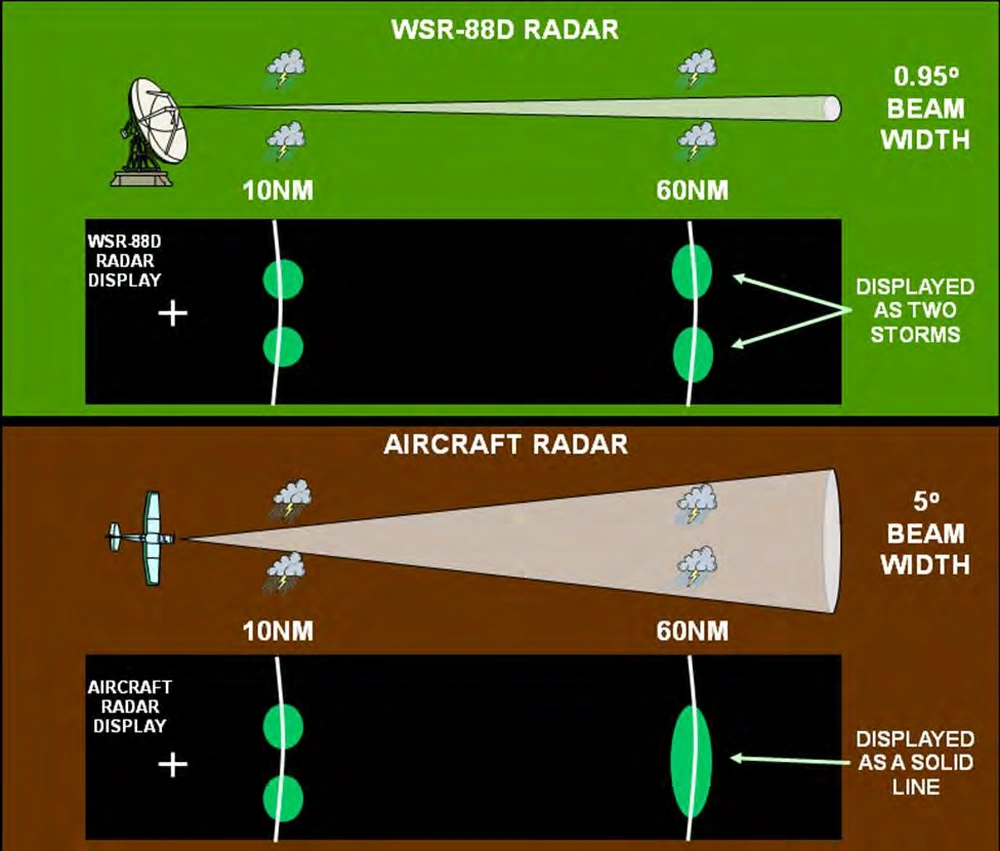
- Resolution decreases with distance. The beam broadens, and targets too close together within it merge into one echo. The handbook's WSR-88D example distinguishes targets about 1 nautical mile (NM) apart at 60 NM, but about 2 NM apart at 120 NM. A line appearing to split as it approaches the radar may reflect improved resolution rather than actual weakening.
- Display range is not a promise of low-level detection. Single-site base-reflectivity products described in the handbook extend to either 124 or 248 NM, depending on the product. Weather beyond the displayed range can be omitted, and shallow weather can be missed well inside it. Use the provider's actual range, coverage, and outage information.
Current Radar Products
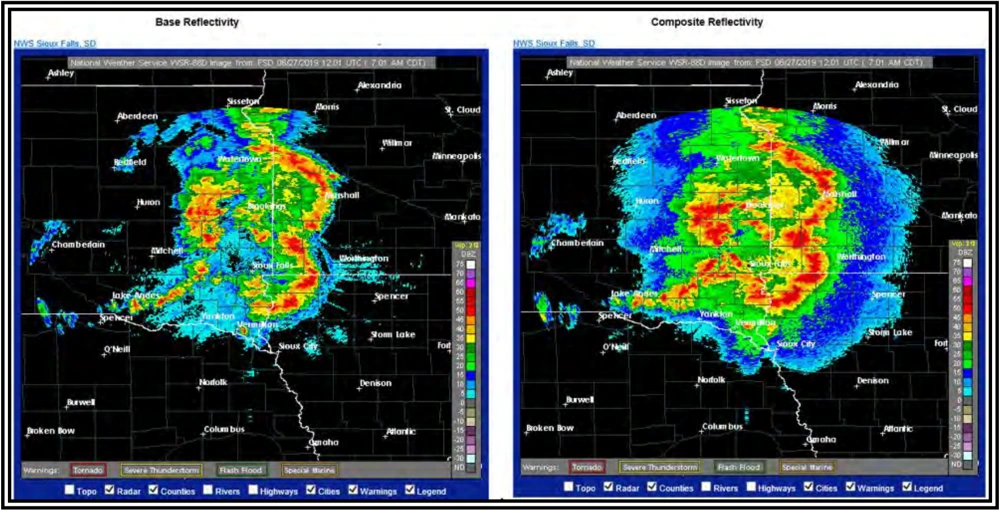
- Use Aviation Weather Center (AWC) Graphical Forecasts for Aviation (GFA) observations or National Weather Service (NWS) radar for supported radar displays. Verify the selected layer, legend and valid time.
- Radar mosaic: multiple radar-site images combined into a regional or national view. Identify whether the mosaic uses base reflectivity, composite reflectivity or echo tops. The Aviation Weather Center uses an MRMS mosaic with additional processing; do not assume every cockpit or website mosaic uses the same product, filtering, or coverage.
- Base reflectivity: reflectivity from the lowest elevation scan, described in the handbook as 0.5° above the horizon. Providers may call it “Lowest Tilt” or “Reflectivity at Lowest Altitude.” It can miss stronger precipitation above that scan; the beam is not at the same height everywhere. A lowest-tilt image can become available several minutes before a composite requiring the full elevation sequence.
- Composite reflectivity: the strongest return in the vertical column across elevation scans. Higher intensity may be aloft, rather than at the surface or your flight altitude. Comparing base and composite images can expose elevated storm structure and intensity trends; check both timestamps before attributing a difference solely to height.
- Echo tops: an estimate of precipitation-top height. The NWS product described by the FAA uses the height of the 18 dBZ echo above mean sea level (MSL). Cloud tops may extend above that detected precipitation top. It does not identify a safe altitude above a thunderstorm.
- Use the provider's color scale and product description. Reflectivity measures returned radar energy; it is not a direct measurement of turbulence or icing.
Convective and Stratiform Precipitation
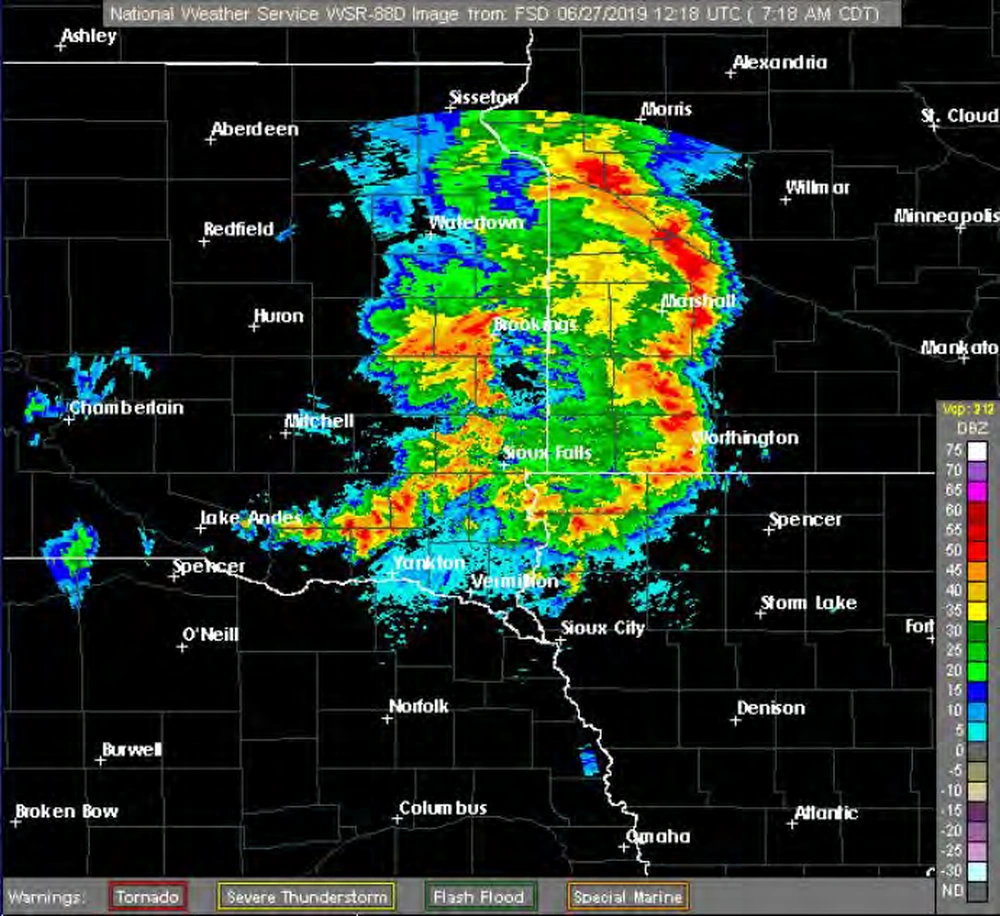
- Convective precipitation commonly forms cells or lines. Echo intensity often changes sharply over short distances, and loops may show rapid growth, movement, or decay. Returns are commonly moderate through extreme, but convection can also produce light echoes.
- Convective hazards extend beyond the strongest colors. Thunderstorms can produce turbulence, low-level wind shear, gusty winds, hail, lightning, icing above the freezing level, tornadoes, and sharply reduced visibility. Radar does not depict the complete hazard boundary.
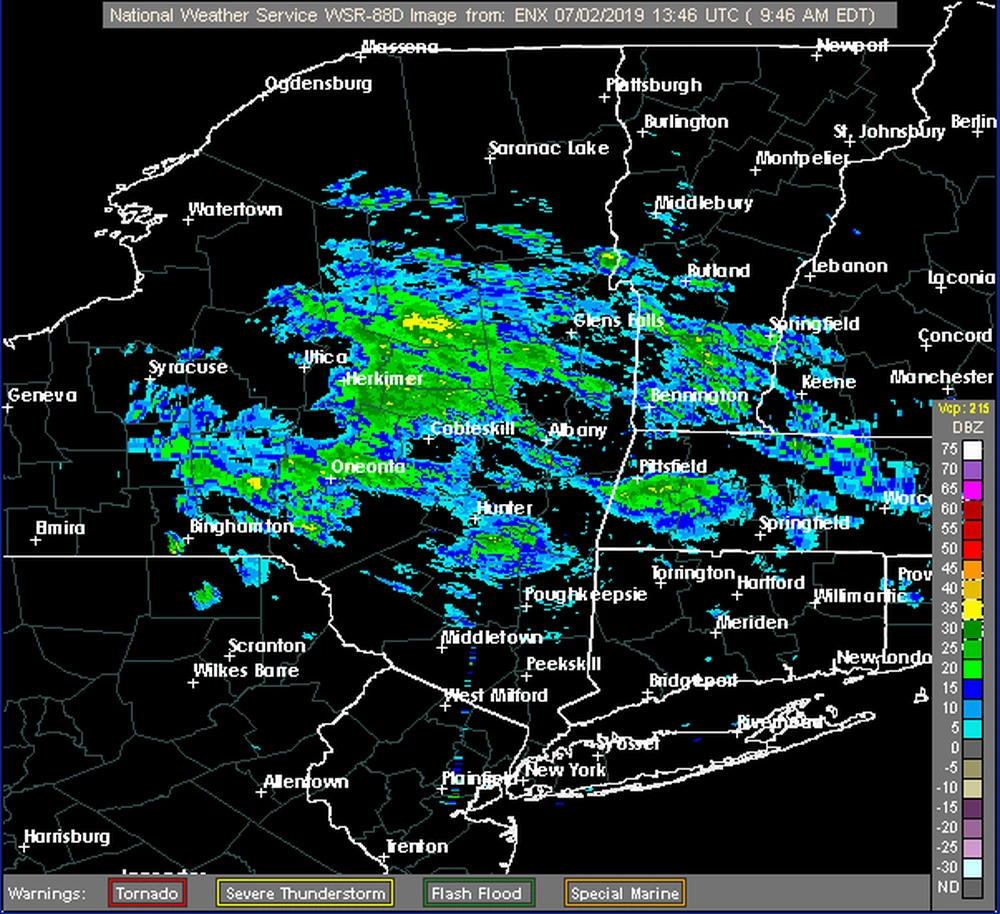
- Stratiform precipitation is commonly widespread and more uniform. Intensity changes are usually gradual, returns are often light or moderate, and patterns generally evolve more slowly. Stronger returns can occur; these characteristics are clues rather than a guarantee of benign weather.
- Widespread stratiform weather still presents flight hazards. Low ceilings, reduced visibility, and icing above the freezing level may accompany it. Rain intensity colors cannot establish the cloud base, visibility, or icing severity.
- Use a loop and supporting weather information. Compare successive images using their timestamps, look for growth as well as motion, and cross-check lightning, satellite imagery, surface observations, forecasts, and pilot reports. Do not extrapolate an apparent gap into a safe route; a delayed mosaic cannot support close-range storm avoidance.
Misleading Radar Returns
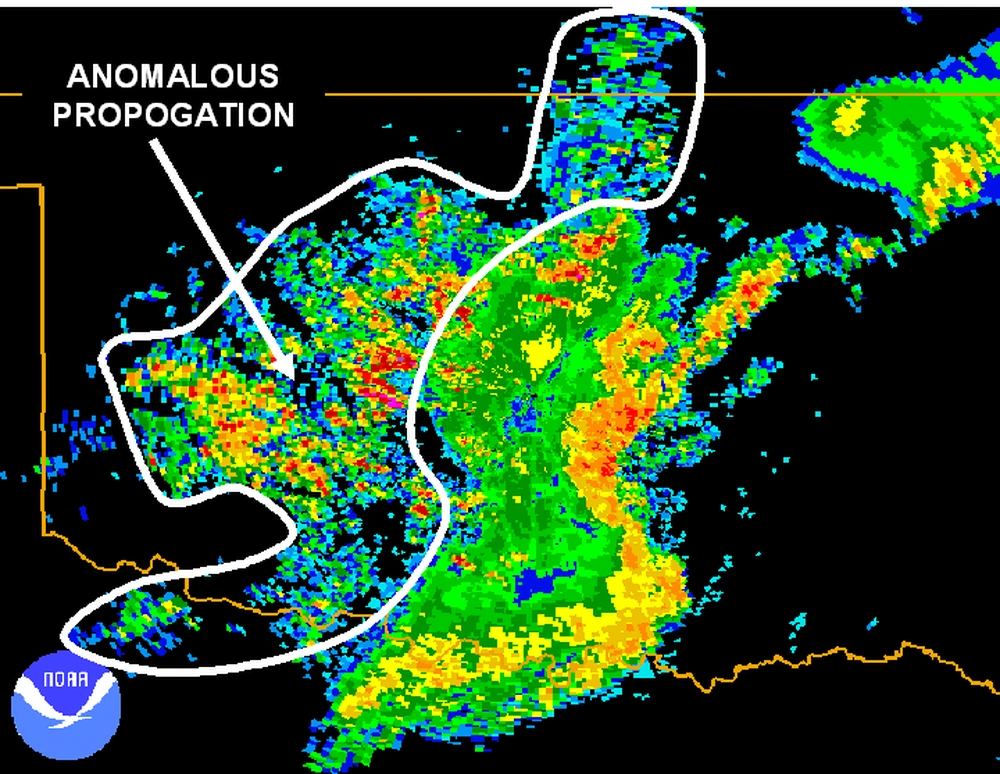
- Ground clutter and unusual refraction can mimic precipitation.
- Ground clutter comes from terrain, buildings, or other surface objects. It often appears near the radar and remains stationary in a loop; filtering removes much, but not all, of it.
- Subrefraction bends the beam less than normal, increasing the risk of overshooting. Superrefraction bends it farther downward; sufficiently strong bending can trap the beam near the surface, called ducting.
- Anomalous propagation (AP) can produce speckled or blotchy ground returns far from the site. Patterns may appear and fade without continuous storm-like motion. Use the loop and other observations together; appearance alone is not proof.
- Biological targets can produce “ghosts” and “angels.” The handbook describes ghosts as diffuse weak echoes associated with small targets or refraction effects, and angels as echoes commonly caused by birds, bats, or insects. Expanding rings near dawn or dusk may reflect animals leaving roosts rather than developing rain.
- Human-made targets can contaminate imagery. Nearby wind turbines can cause false returns, exaggerated intensity, or blockage. Military chaff can also produce echoes. A radar return is evidence of reflected energy, not automatically precipitation.
- A bright band can exaggerate precipitation intensity. Melting snow or ice coated with water returns more energy than particles above or below the melting layer. This enhanced-reflectivity band can lead to excessive rainfall estimates; it does not by itself establish heavier rain at the surface or safe icing conditions.
- Check suspicious returns rather than dismissing them. Compare motion, neighboring radars, base and composite products, satellite imagery, surface reports, and the provider's quality information. Processing that removes clutter can also remove real weather. Keep adequate avoidance margins when the interpretation remains uncertain.
Terminal Doppler Weather Radar
- Terminal Doppler Weather Radar (TDWR) is an FAA-operated system focused on hazardous wind shear, precipitation, and winds near selected major airports with significant thunderstorm exposure.
- Its airport-area role differs from a national radar mosaic. It supports detection of localized terminal hazards; a national or regional precipitation display does not provide an equivalent wind-shear assessment.
- TDWR uses long- and short-range scans and monitor and hazardous-weather modes. The handbook describes update times of about 5 minutes in monitor mode and 1 minute in hazardous-weather mode; the timing of a delivered website or cockpit product can differ.
- Selected TDWR products are available through National Weather Service (NWS) radar websites. Check the site, product, valid time, and coverage. Not every airport has TDWR, and not every terminal warning product is reproduced in a public reflectivity image.
- Use airport wind-shear and microburst alerts, current observations, and aircraft guidance together. A weak or clear precipitation display does not rule out wind shear. Viewing TDWR imagery does not replace an operational alert or an aircraft-specific response.
Radar Data Age and Flight Planning
- Check the observation or valid time, the display's stated age, the update time, and any missing-data or outage indications. Receipt of a new image does not mean every part of it was observed at that moment.
- Radar sites scan independently. A mosaic combines observations with different times, then incurs processing and transmission delay.
- The FAA warns that datalinked mosaic precipitation can be 15–20 minutes older than the age indicated on the display. This is an additional-age warning, not a fixed delay for every radar product.
- Use datalinked radar for strategic avoidance: delaying departure, choosing a wider route, or diverting early. Do not use it for close-range maneuvering through apparent gaps between cells.
- Review successive images for trends, while allowing for new development, rapid intensification and changing storm motion. Combine radar with current observations, advisories, lightning information and pilot reports.
Radar Interpretation and Limitations
- The retired chart was a preflight-planning aid. Today's radar also supplies only part of the weather picture; a precipitation-free display does not establish safe flying conditions.
- Beam overshoot and blockage: distant low-level precipitation or weather behind terrain can be missed. Radar coverage depends on height, range and site availability.
- Non-weather echoes and propagation effects: ground clutter, insects, dust and unusual beam propagation can create misleading returns. Radar type and processing also affect what appears.
- Ground-based and airborne radar respond differently to attenuation.
- The handbook describes WSR-88D's approximately 10-centimeter wavelength as much less affected by precipitation attenuation than the approximately 3-centimeter wavelength typical of airborne radar.
- Airborne radar may show only the near edge of very strong precipitation because absorption and scattering reduce the energy reaching weather beyond it. A weak return behind a strong one is not automatically a safe opening.
- WSR-88D compensates for range-related signal loss. Airborne compensation depends on the equipment and may be limited; follow the aircraft radar's operating guidance rather than transferring ground-radar assumptions to it.
- A broad beam can merge separate targets. Aircraft radar generally has a wider beam than WSR-88D, reducing its ability to separate distant cells. Zooming a display does not recover detail that the radar never resolved; see coverage and beam height.
- Echo tops are not cloud tops. Clouds may extend higher than detected precipitation. Reflectivity cannot directly establish turbulence intensity, icing severity, ceiling or visibility.
- Strong precipitation can accompany hazardous convection, but neither color alone nor weak echoes reliably establishes the absence of a hazard. Consult other weather products and preserve avoidance margins.
Precipitation Type and Coverage
- For the retired chart, use the historical precipitation symbols and coverage limitations.
- For a modern image, read the selected product's legend. Reflectivity alone does not reliably identify precipitation type or snowfall rate, and shading does not guarantee precipitation reaches the ground.
Ceiling, Visibility and Flight Categories
- Radar does not determine a flight category. A clear radar image may coexist with low ceilings, fog or poor visibility.
- Use current routine and special aviation weather reports, terminal forecasts and the GFA ceiling and visibility layers. Dashed and solid flight-category boundaries from other chart types are not radar-summary symbols.
Freezing Levels and Icing
- The retired radar summary chart did not plot freezing levels. Consult temperature and freezing-level information, icing products and pilot reports for the planned route and altitude.
- Precipitation in subfreezing air can be a warning sign, but radar alone does not establish icing type or severity. The absence of a freezing-precipitation symbol on the historical chart did not exclude that hazard.
Turbulence and Convective Hazards
- The retired radar summary chart did not plot forecast turbulence layers. Use turbulence guidance, pilot reports and applicable aviation weather advisories.
- Convective precipitation can indicate hazardous storm activity, but radar does not directly measure the turbulence your aircraft will encounter. Weak echoes do not rule out turbulence.
- See Prognostic Charts for the meaning of forecast-area symbols; do not apply them to this retired radar product.
Radar Summary Chart Knowledge Check
Choose the knowledge check that matches your current training for Radar Summary Chart.

PPL knowledge check
Core Knowledge Review
Review foundational knowledge, key concepts, and practical considerations. Topic: Radar Summary Chart.
- Immediate feedback
- Answer explanations
- Account progress tracking

CPL knowledge check
Advanced Application
Apply knowledge to advanced operations, risk management, and aeronautical decision-making. Topic: Radar Summary Chart.
- Immediate feedback
- Answer explanations
- Account progress tracking
Why Take a Quiz?
Quizzes reinforce key concepts, identify knowledge gaps, and build confidence for real-world decisions. Quiz material is representative of the information provided here and is not based on or sourced from the Federal Aviation Administration test bank.
Radar Summary Chart Interactive Scenario
The Archived Radar Chart in a Current Briefing
Recognize a legacy radar product and replace it with current, time-aware convective information.
Scenario Complete
Radar Summary Chart Conclusion
- The legacy radar summary chart is retired. Use it to learn historical symbology, then obtain current weather information for flight decisions.
- Current radar imagery supports weather assessment when its time, coverage and limitations are understood. Combine it with other observations, forecasts and advisories; do not use datalinked mosaics to thread between storms.
- For more information, a paper copy of Federal Aviation Administration (FAA-H-8083-28) Aviation Weather Handbook [Amazon] is available for purchase
- A digital copy of Federal Aviation Administration (FAA-H-8083-28) Aviation Weather Handbook is available from the FAA's website
- Improve your weather skills with FAA provided (and WINGS credited) resources by going to https://www.faasafety.gov/ and type "weather" into the search bar
Radar Summary Chart References
- FAA-H-8083-28B, Aviation Weather Handbook (2026) — Chapters 15 and 24, Sections 15.2.1–15.2.15 and 24.6.1–24.6.2.
- FAA Aeronautical Information Manual, Chapter 7, Section 1 — FIS-B intervals (Table 7-1-9), weather radar services (7-1-11), ATC inflight weather avoidance assistance and precipitation-intensity descriptions (7-1-12), and wind-shear detection (7-1-25).
- NWS Technical Implementation Notice 13-11 — termination of the legacy radar graphics effective June 11, 2013.
- Advisory Circular 00-45G, Change 1, Section 5.6 — historical source for the retired chart; not current service guidance.
- AWC Graphical Forecasts for Aviation — current observations and forecasts.
- NWS Radar — current radar imagery.
- NWS Glossary: Bright Band — melting-layer effects on reflectivity and rainfall estimates.
- AWC GFA Help — MRMS mosaic processing and coverage limitations.
- AWC Help — current product access and website guidance.